What is CSS?
CSS is the language we use to style a Web page.
- CSS stands for Cascading Style Sheets
- CSS describes how HTML elements are to be displayed on screen, paper, or in other media
- CSS saves a lot of work. It can control the layout of multiple web pages all at once
- External stylesheets are stored in CSS files
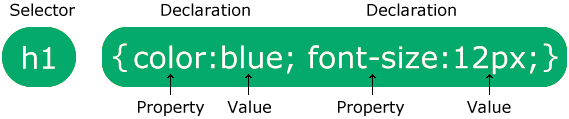
The selector points to the HTML element you want to style.
The declaration block contains one or more declarations separated by semicolons.
Each declaration includes a CSS property name and a value, separated by a colon.
Multiple CSS declarations are separated with semicolons, and declaration blocks are surrounded by curly braces.
CSS selectors are used to "find" (or select) the HTML elements you want to style. We can divide CSS selectors into five categories:
- Simple selectors (select elements based on name, id, class)
- Combinator selectors (select elements based on a specific relationship between them)
- Pseudo-class selectors (select elements based on a certain state)
- Pseudo-elements selectors (select and style a part of an element)
- Attribute selectors (select elements based on an attribute or attribute value)
Comments are used to explain the code, and may help when you edit the source code at a later date.
Comments are ignored by browsers.
A CSS comment is placed inside the
The CSS border properties allow you to specify the style, width, and color of an element's border.
The border-style property specifies what kind of border to display.
dotted- Defines a dotted borderdashed- Defines a dashed bordersolid- Defines a solid borderdouble- Defines a double bordergroove- Defines a 3D grooved border. The effect depends on theborder-colorvalueridge- Defines a 3D ridged border. The effect depends on the border-color valueinset- Defines a 3D inset border. The effect depends on the border-color valueoutset- Defines a 3D outset border. The effect depends on the border-color valuenone- Defines no borderhidden- Defines a hidden border
The CSS margin properties are used to create space around elements, outside of any defined borders.
With CSS, you have full control over the margins. There are properties for setting the margin for each side of an element (top, right, bottom, and left).
The CSS padding properties are used to generate space around an element's content, inside of any defined borders.
With CSS, you have full control over the padding. There are properties for setting the padding for each side of an element (top, right, bottom, and left).
When styling links, it's important to understand how to make use of pseudo-classes to style their states effectively. It's also important to know how to style links for use in common interface features whose content varies, such as navigation menus and tabs. We'll look at both these topics in this article.
In HTML, there are two main types of lists:
- unordered lists
(<ul> )- the list items are marked with bullets - ordered lists
(<ol>)- the list items are marked with numbers or letters
The CSS list properties allow you to:
- Set different list item markers for ordered lists
- Set different list item markers for unordered lists
- Set an image as the list item marker
- Add background colors to lists and list items
The CSS math functions allow mathematical expressions to be used as property values. Here, we will explain the calc(), max() and min() functions .
The calc() function performs a calculation to be used as the property value.
The max() function uses the largest value, from a comma-separated list of values, as the property value.
The min() function uses the smallest value, from a comma-separated list of values, as the property value.
All the documentation in this page is taken from w3schools.